Bookboost changelog
Changelog
The latest Bookboost releases and improvements.
By continuing, you agree to our T&C and Privacy Policy.
Master Profiles in the Unified Inbox & More
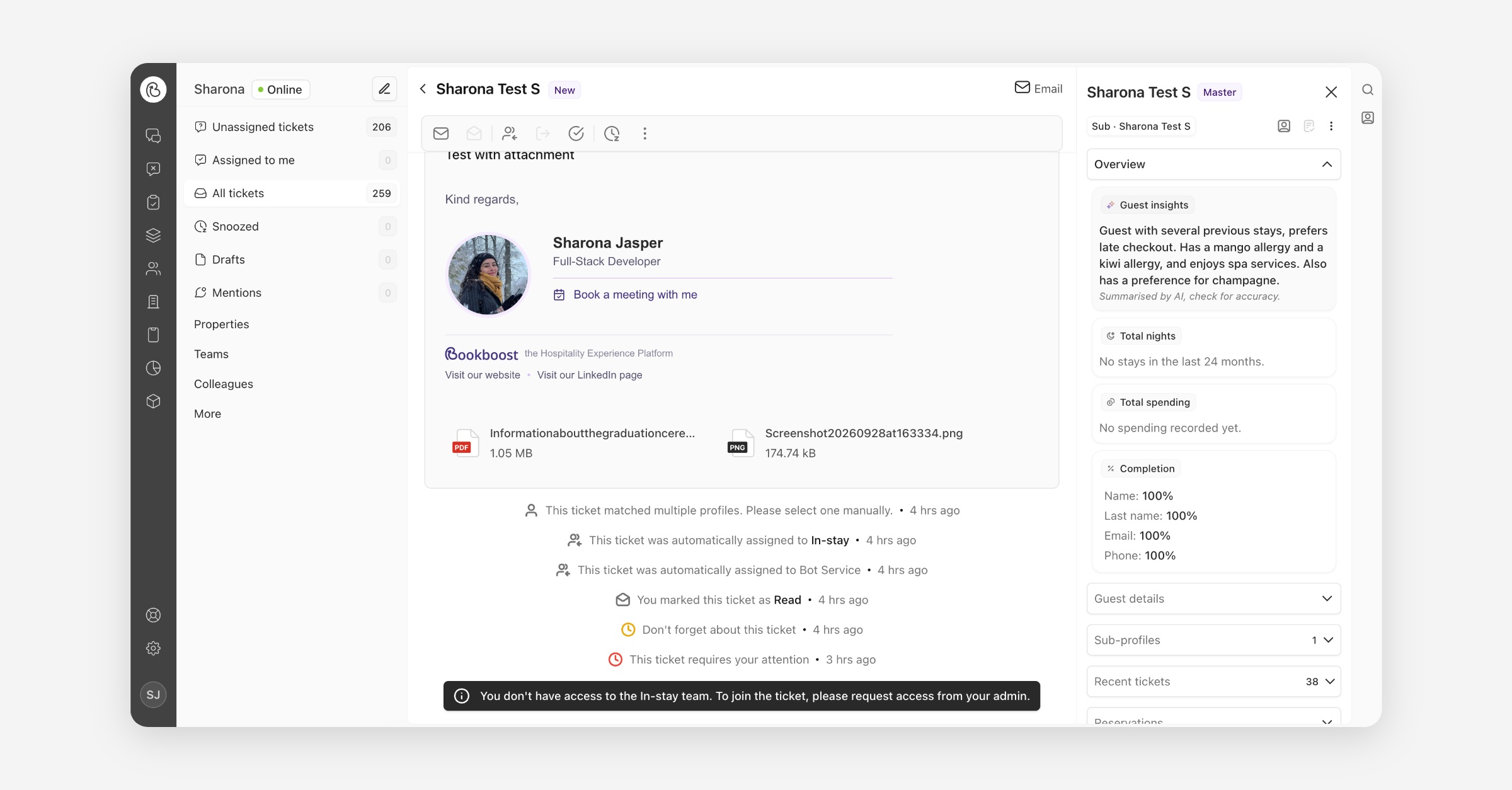
Master Profiles in the Unified Inbox
See the whole guest, right in your inbox. When a guest has more than one profile — for example because they've written in from different email addresses or booked through different channels — the guest panel now brings everything together into one master profile. You get their combined stays, spending, tickets, campaigns and form submissions, plus an AI-generated guest insight, without leaving the conversation. Open any ticket from a guest with a master profile and the new panel appears automatically on the right.
Direct Downloads for Document Attachments
Clicking a document attachment in the Inbox now downloads it directly, so you no longer need to right-click and choose Save as. Images, videos and audio still open in a new tab for quick viewing.
More improvements & fixes
General
PDI Importer redesign — The property data importer has a design makeover and improved UX. It now pre-scans uploaded files to prefill parsing options and column headers, includes helpful warnings for common mistakes, and has a cleaner, more modern look.
New Ticket Creation Flow, Saved Guest Views & More
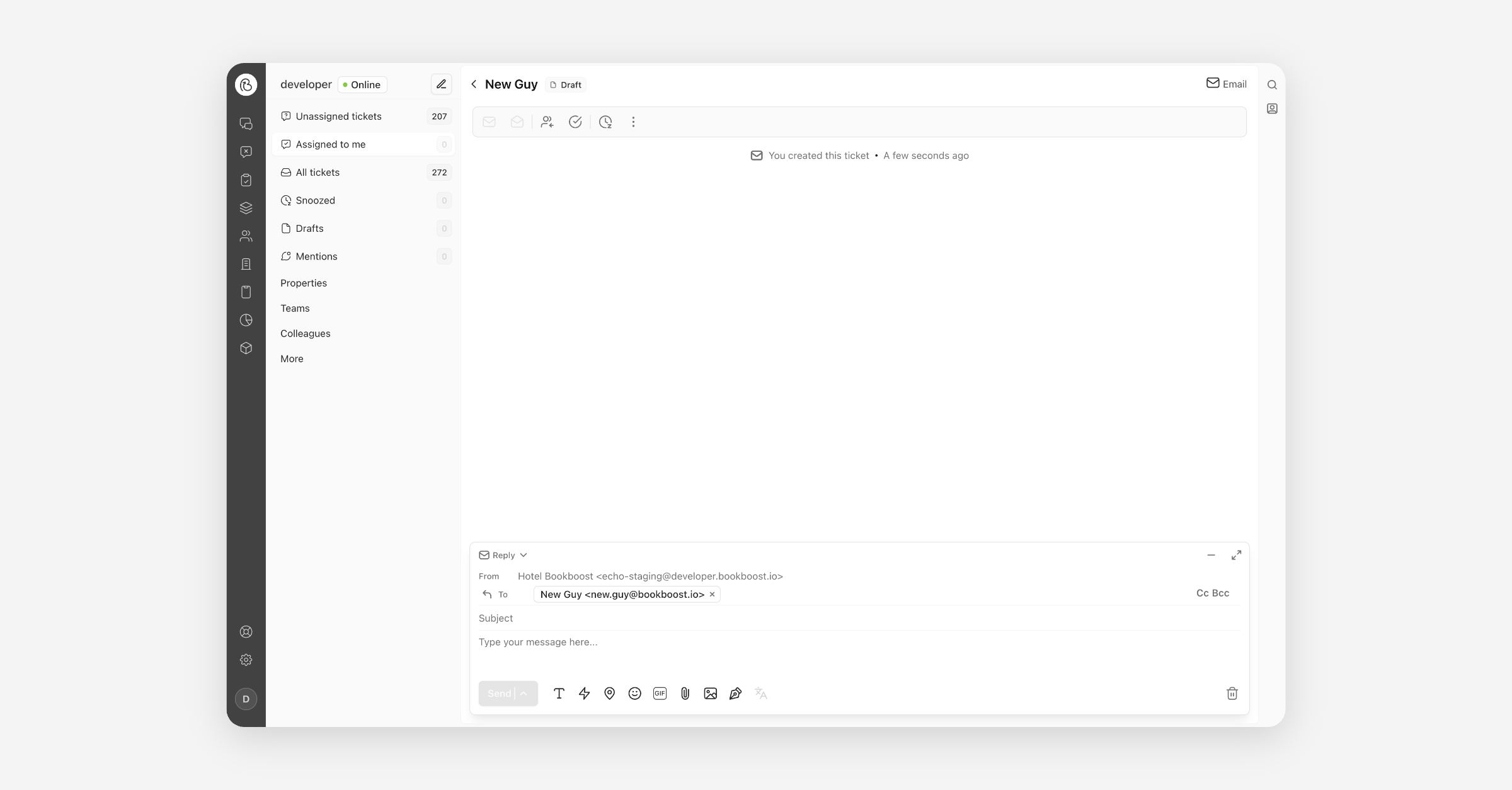
New Ticket Creation Flow
Starting a new conversation in the Inbox is now as quick as writing an email. Instead of setting up a guest profile before you can type, you open the composer, search for a guest in the To field — or simply type an email address or phone number — choose the channel and the property you are sending from, and send. If an open ticket already exists for that recipient, we show it before you send so you can continue the existing conversation rather than starting a duplicate, and anything you leave half-written is saved to Drafts.
Saved Views on the Guests Table
You can now save your favourite filters on the Guests table as views. Set up the filters, columns and sorting you need, give the view a name, and it is one click away the next time you open Guests. Keep a view to yourself or share it with everyone in your organisation so the whole team works from the same list, and send a colleague the link to open exactly what you see.
Require Two-Factor Authentication for All Operators
Organisations can now require every operator to use two-factor authentication. Once enabled, each operator sets up an authenticator app the next time they sign in — scan a QR code, enter the six-digit code, and they are protected by a second factor from then on. It is off by default; contact your customer success manager to require it for your organisation. If someone loses their authenticator, Bookboost can reset it so they can set up a new one.
Property-Scoped AI Agents
Your AI Agents can now be tied to a single property or kept across your whole organisation. If you run the same Agent name at several hotels, use the scope selector at the top of the Agent overview to switch between properties and see exactly which Agents belong where, and a property-scoped Agent will only ever pick up conversations belonging to that property. We've also standardised the wording: what was sometimes called a "Bot" is now consistently an "Agent" across the interface.
More improvements & fixes
Bookboost CRM
Multiple sending and reply-to addresses for campaigns — You can now send campaigns from more than one email domain, and choose a different reply-to address for each campaign — even on another domain. Add your approved addresses under Campaigns → Email addresses, then pick them when creating a campaign. To add a new sending domain, please contact our support team.
Spam complaint metrics in campaign reporting — Your spam complaint rate is now visible in the marketing dashboard alongside hard and soft bounce rates, and each individual campaign and journey report shows how many recipients marked that message as spam. History is available from day one.
Bookboost Inbox
Drag-and-drop attachments in the composer — Drag files straight from your desktop into a conversation and they'll attach to your reply. Email supports multiple files at once; messaging channels take a single image or document. The conversation shows you exactly what will happen as you drag, and flags files that are too large or the wrong type.
Improved inbox and recipient search — Search now matches on part of an email address, a phone number from either end, and words from a ticket's subject line. Results keep loading as you scroll, and each category shows how many matches it has.
Routing rules with deleted audiences no longer break auto-assignment — A team rule pointing at a deleted audience now evaluates as "no match" instead of failing the entire assignment pass. Conversations keep reaching the right team, and the broken rule is flagged in red in your team settings so it's easy to find and fix.
Guest Insights, AI Agent Reservation Context & More
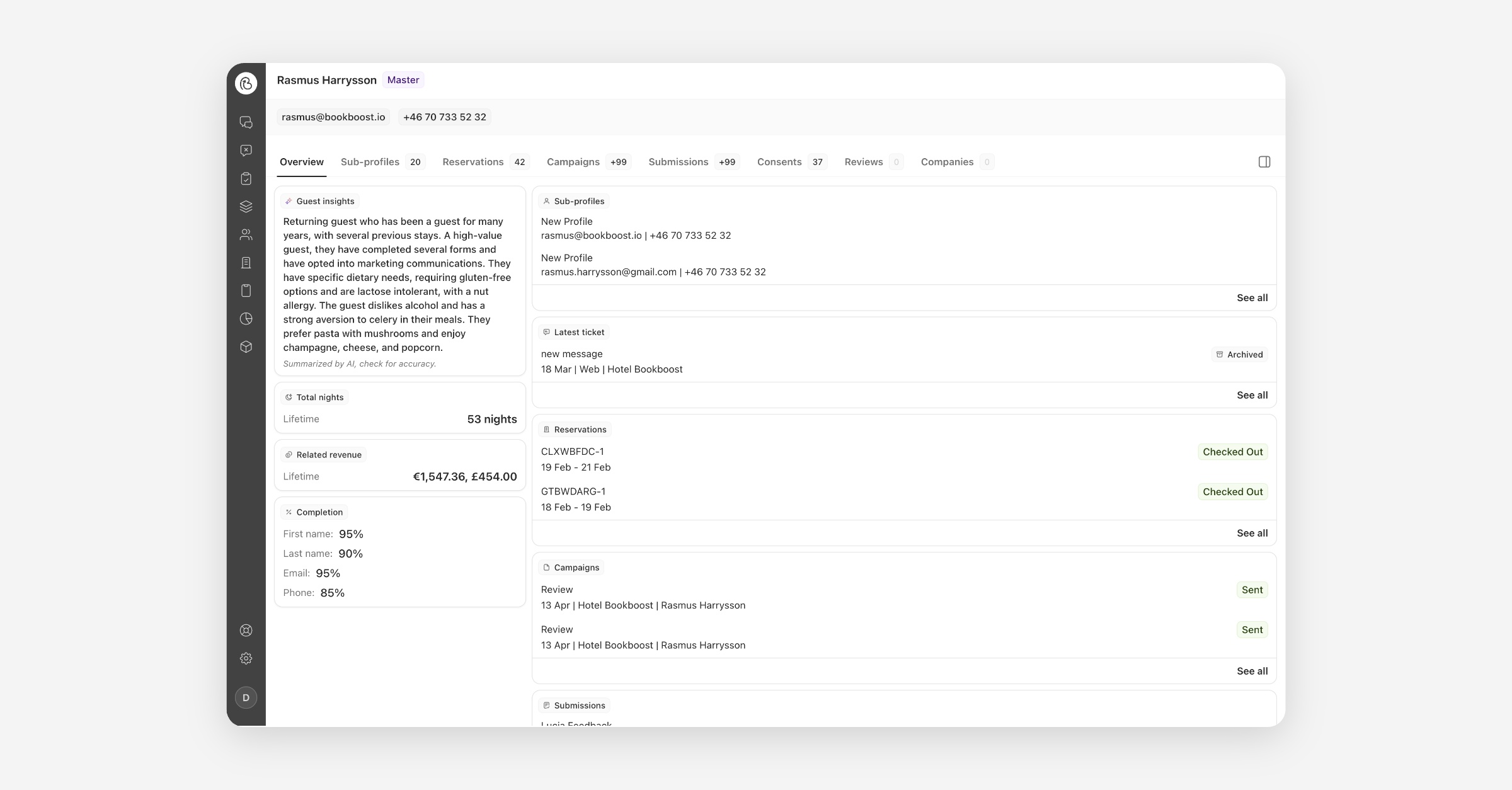
AI Guest Insights on the Master Profile
The master profile now opens with an AI-generated Guest Insights summary — stay patterns, travel habits, and preferences like allergies or favourite room types, distilled from reservation history, reviews and notes into a few sentences. Summaries are privacy-first: names, exact dates, and amounts are deliberately left out. Open any guest's master profile and the Guest Insights card on the Overview tab does the rest.
AI Agent: Reservation Context on Trusted Channels
Your AI Agent can now answer guest questions about their reservation — arrival date, nights, extras, total price, booking status — directly and accurately. Verification is effortless: on WhatsApp, SMS, or email, the guest simply provides their booking reference, and the system matches it against their contact on the reservation automatically. Once verified, the agent answers immediately and the channel stays verified for 7 days. Guests replying to a reservation campaign are verified implicitly, with no booking reference needed at all.
Reservations Views: Arrivals, Departures and In-House
Finding the right reservations just got faster. The reservations list now has four views in the sidebar — All, Arrivals, Departures, and In-House — so you can go straight to who is checking in, checking out, or staying with you right now. Pick a timeframe of today, tomorrow, the next seven days, or any custom date range, and layer on extra filters if needed. Each view remembers how you last set it up, and every view has its own link so your morning list is always one click away.
Invite Several Operators at Once
Inviting colleagues is now quicker and more complete. Paste a whole list of email addresses from a spreadsheet or email and invite everyone in one go. Bookboost fills in each person's name from their address, and you can set what properties they can see, what role they have, and which team they join — all before anything is sent. Typos and duplicates are flagged before invitations go out, and if something fails you can retry just that person without re-inviting everyone else.
Inline Text Formatting in the Guest App
You can now format individual words inside a text block on your Guest App pages. Highlight any part of your text and a small toolbar appears with bold, italic, strikethrough and link — or type the way you would in a chat message, with asterisks for bold and underscores for italic. It means the detail that matters — a check-in time, a wifi password, a note that something is unavailable — can stand out on its own, without splitting your text into separate blocks.
More improvements & fixes
Bookboost CRM
View in Browser Link for Campaign Emails — Add a "View in browser" token to any campaign email and every recipient gets a unique link to a web version that looks exactly like the email they were sent.
Total Money Spent now includes all linked reservations — A guest's spend now counts every reservation they're connected to — including stays they booked for others — so your spend figures and audience segments reflect the people really driving revenue.
Bookboost CDP
Flexible broadcast revenue attribution in BB Insights — Analyse campaign revenue using the attribution window that best matches your business, instead of a fixed 30-day rule. Open the Marketing Dashboard and apply the window you want.
Language filtering in the BB Insights Marketing Dashboard — See how sends, opens, clicks, replies, and conversions differ across the languages used for your recipients, so you can optimise content and targeting with more precision.
Apaleo: children now imported correctly, reservation tax fixed — Children on Apaleo reservations were previously never imported, and reservation tax figures were overstated. Both have been corrected across all Apaleo properties.
Bookboost Inbox
Redesigned Teams overview in Settings — Active teams now show as a ranked routing list so you can see exactly which team a message reaches first. Reorder by drag, by typing a position, or in bulk, with Undo on every change.
"Ends with" / "Does not end with" for Sender Email Address rules — Include or exclude entire domains from team routing with one rule, instead of adding a separate exact-match entry for every subdomain.
General
OTA reservations no longer lose guest and booker records — A bug causing reservations with two folio debtors to lose their guest, booker, and debtor records on every sync has been fixed. Particularly affects OTA bookings with a guest folio and a company folio (e.g. Expedia).
Reservation date filters now use local time — Date filters in the reservations table now correctly use the user's local time instead of UTC, so bookings made close to midnight appear in the right day's results.
Improved knowledge creation flow for the AI Agent — Facts and FAQs are now one unified Knowledge concept. Import from a hotel website, another agent, or a local document, and tag items to keep larger knowledge bases organised.
Automatic Sign-Out After Inactivity — Organisations can now opt in to automatic sign-out after a chosen idle period — ideal for shared reception desks. A 1-minute warning dialog lets active users stay signed in with a single click. Contact your customer success manager to enable it.
Internal Mentions, SFTP File Imports & More
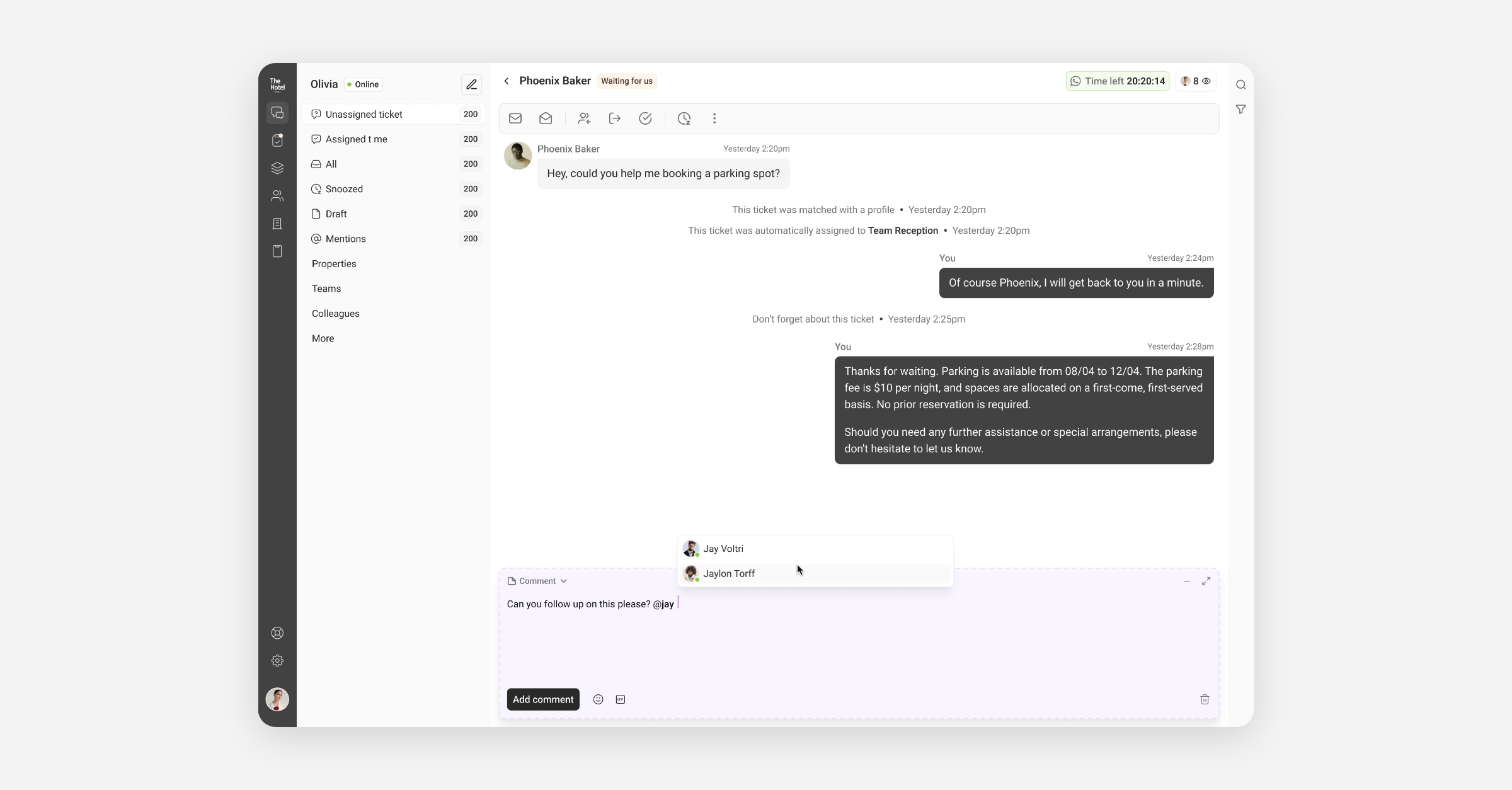
Mentions for Internal Communication
Collaborate with your team without leaving the conversation. You can now add internal notes inside any Inbox conversation and @mention colleagues to bring them in — all kept private and never shown to the guest. Mentioned teammates get notified and can jump straight to the note, and a new Mentions view collects every conversation where you were tagged. To get started, open a conversation, switch the composer to Comment, and type @ to mention someone.
Inbox Dashboard: Remembered Filters & Readability Improvements
We've refined the Inbox Dashboard to make it easier to use every day. Your date, property, and channel filters are now remembered across refreshes and visits, so you don't have to re-apply them each time. Long response times are now shown in days for quick reading, and loading and empty states are cleaner throughout.
Master Profiles in Insights, Email Bounce Protection & More
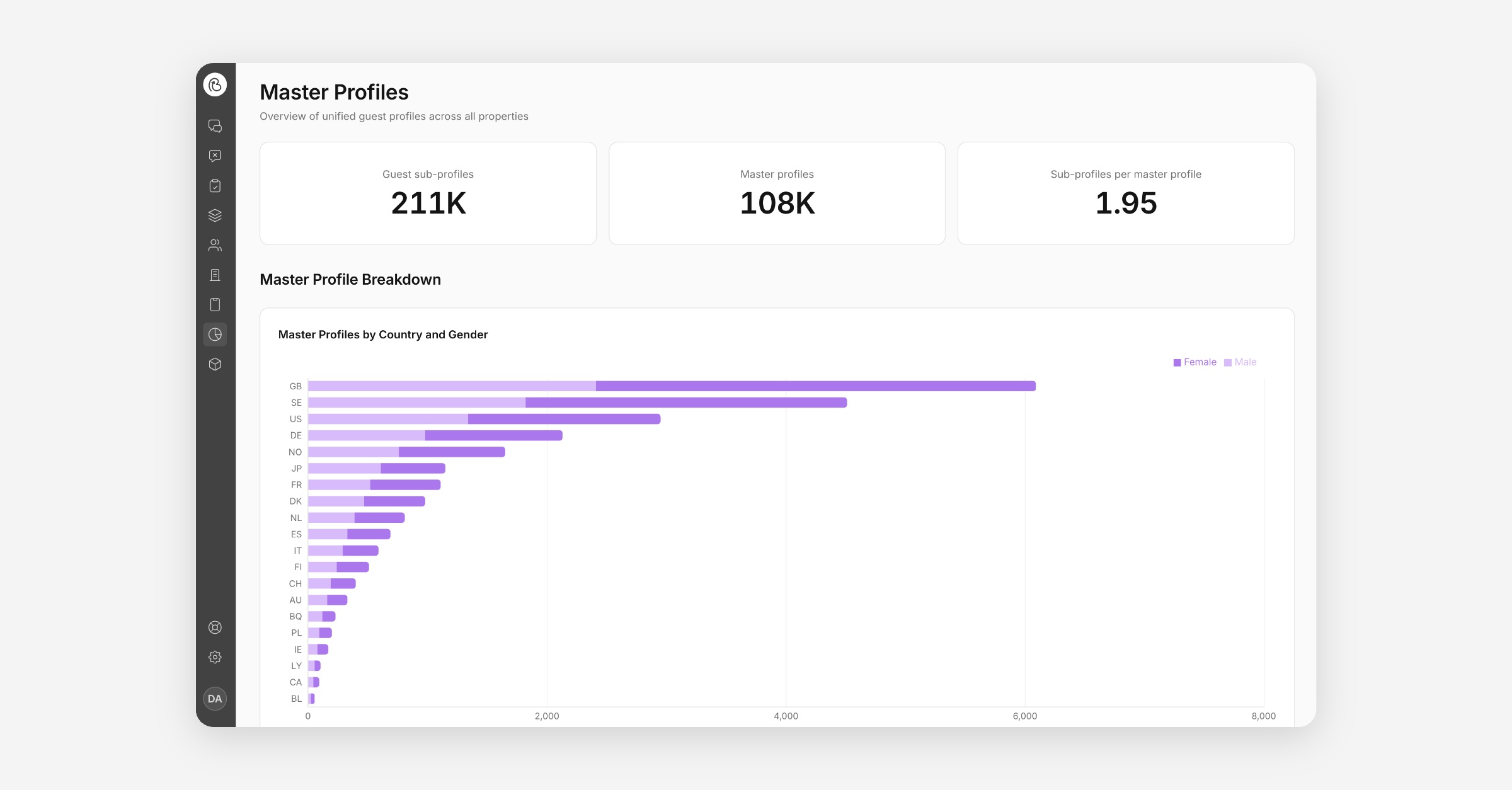
Master Profiles in Bookboost Insights
Master Profiles are now available directly in Bookboost Insights. You can analyse guest behaviour and segment data at the master profile level — giving you a cleaner, deduplicated view of your guests across all properties. This makes your CDP reporting significantly more accurate and actionable for multi-property groups.
Master Profile: Campaigns Tab Improvements
The Campaigns tab on Master Profile pages has been improved to give a clearer picture of campaign activity across properties. You can now more easily review which campaigns have been sent to a guest and track engagement at the master profile level.
Automatic Email Bounce Protection
Bookboost now automatically excludes guests who have hard-bounced from future email campaigns. This runs in the background without any manual intervention — protecting your sender reputation and keeping your lists clean by default.
Custom Brand Assets for Guest App Pages
You can now upload custom brand assets directly to Guest App pages. This gives your team more control over the visual identity of guest-facing content, making it easier to align pages with your property's branding without relying on global settings.
More improvements & fixes
Bookboost CRM
Property selector on reservation count audience filters — You can now filter audiences by reservation count per specific property, making it easier to build targeted segments for individual properties within a group.
Bookboost CDP
Company Data in Insights — Company-level data is now visible in the Insights module, giving group properties and corporate accounts better visibility into company-linked guest activity.
Unified Inbox Dashboard
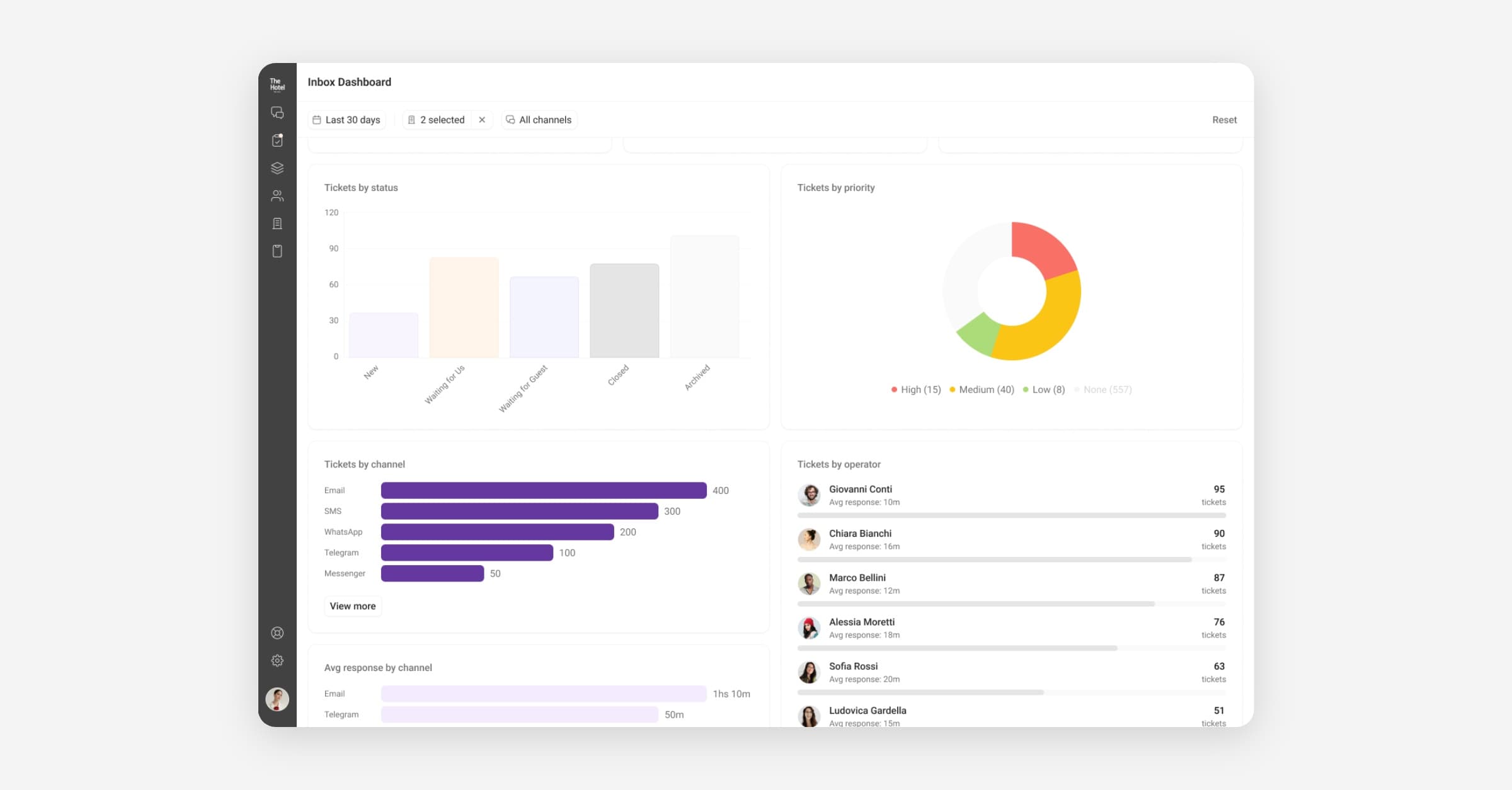
Unified Inbox Dashboard
We have released a dedicated analytics dashboard for the Unified Inbox, giving you a clear view of conversation volumes, response times, resolution rates, and team performance over time. Track trends, identify bottlenecks, and make data-driven decisions about staffing and workflows without leaving Bookboost.
The Unified Inbox Dashboard is currently in Early Release — reach out to [email protected] to get access.
Search Improvements in the Unified Inbox
Search in the Unified Inbox has been improved to help teams find guest conversations faster. Operators can now search by details such as name, surname, email address, phone number, and reservation number, making it easier to locate the right thread without switching to another system. Results include more useful context so teams can quickly identify the correct conversation. This new search experience is connected to the existing search bar in the Unified Inbox.
Inbox Automations
You can now set up rule-based automations directly in the Unified Inbox. Create rules that automatically assign conversations, add tags, change status, or send quick replies based on triggers like keywords, sender, channel, or time of day. This reduces repetitive manual work for your team and ensures consistent handling of common conversation types.
For example, out-of-office replies send a predefined message when no operator is available, with timezone-aware scheduling.
Go to Inbox Settings → Automations to set up your first automation.
Bookboost Insights — Guest & Loyalty Data
Bookboost Insights now includes guest demographic and loyalty data in its analytics. You can explore segments by nationality, loyalty tier, age range, and more — giving your marketing and revenue teams the audience intelligence they need to build more targeted campaigns and offers.
Guest Channel Preference
Bookboost can now capture a guest's preferred communication channel directly in forms, and then honour that preference when sending campaigns. If a guest indicates they prefer WhatsApp over email, Bookboost routes your campaign accordingly — no manual segmentation needed. This helps you reach guests in the way they actually want to hear from you.
WhatsApp Template Rejection Notifications
When a WhatsApp template is rejected by Meta, Bookboost now surfaces a clearer, more actionable notification so you know exactly what happened and can take corrective action faster.
Currently in BETA — reach out to [email protected] for access.
More improvements & fixes
Bookboost CRM
Hard Bounce Exclusions
Email addresses that have hard bounced are now automatically excluded from future campaigns. This keeps your sender reputation healthy, reduces wasted sends, and ensures you stay compliant with email deliverability best practices — all without any manual list management.
Dynamic Date Filters for Stay Conditions
The "Guest is in Hotel" and "Guest stays over at Hotel" campaign conditions now support dynamic date filtering. You can target guests relative to today's date — for example, "guests who are in the hotel in the next 3 days" — making it easier to run automated in-stay campaigns without creating new audiences every day.
Guest channel preference toggle
Fixed an issue where the "Prioritise guest channel preference" toggle on campaigns and broadcasts was not being saved and returned correctly.
WhatsApp template approval
Fixed a bug where templates containing the Mews resource access token were failing Meta approval validation.
Journey template preview
Fixed an error that occurred when previewing a journey email template containing the Unsubscribe Link or Content Block merge tags.
Broadcast creation at head office level
Fixed an issue preventing broadcasts from being created at the head office level for certain multi-property organisations.
Bookboost CDP
Apaleo Reservation Notes & Tokens
Reservation notes from Apaleo are now synced into Bookboost and available as dedicated personalisation tokens. Use them in your campaigns and journey messages to reference stay-specific notes without manual copy-pasting.
Opera Cloud Group Reservations
Bookboost now syncs group and allotment reservations from Opera Cloud into the CDP. Group bookings are no longer invisible in Bookboost — they're treated as first-class reservations, available for segmentation, automation, and reporting.
Bookboost Inbox
Emails displaying blank
Fixed an issue where emails whose body consisted primarily of an embedded image were rendering as completely blank in the Unified Inbox.
Bookboost Guest App
Phone field country code ordering
Fixed incorrect sorting of countries in the country code selector within guest app forms.
Forms: Update Reservation Start/End Time in Mews
Mews 2-way forms now support updating a reservation's start and end time directly from a guest app form. This enables use cases like early check-in requests or late check-out approvals to be handled via a self-service form without any manual PMS update.
Recurring Broadcasts
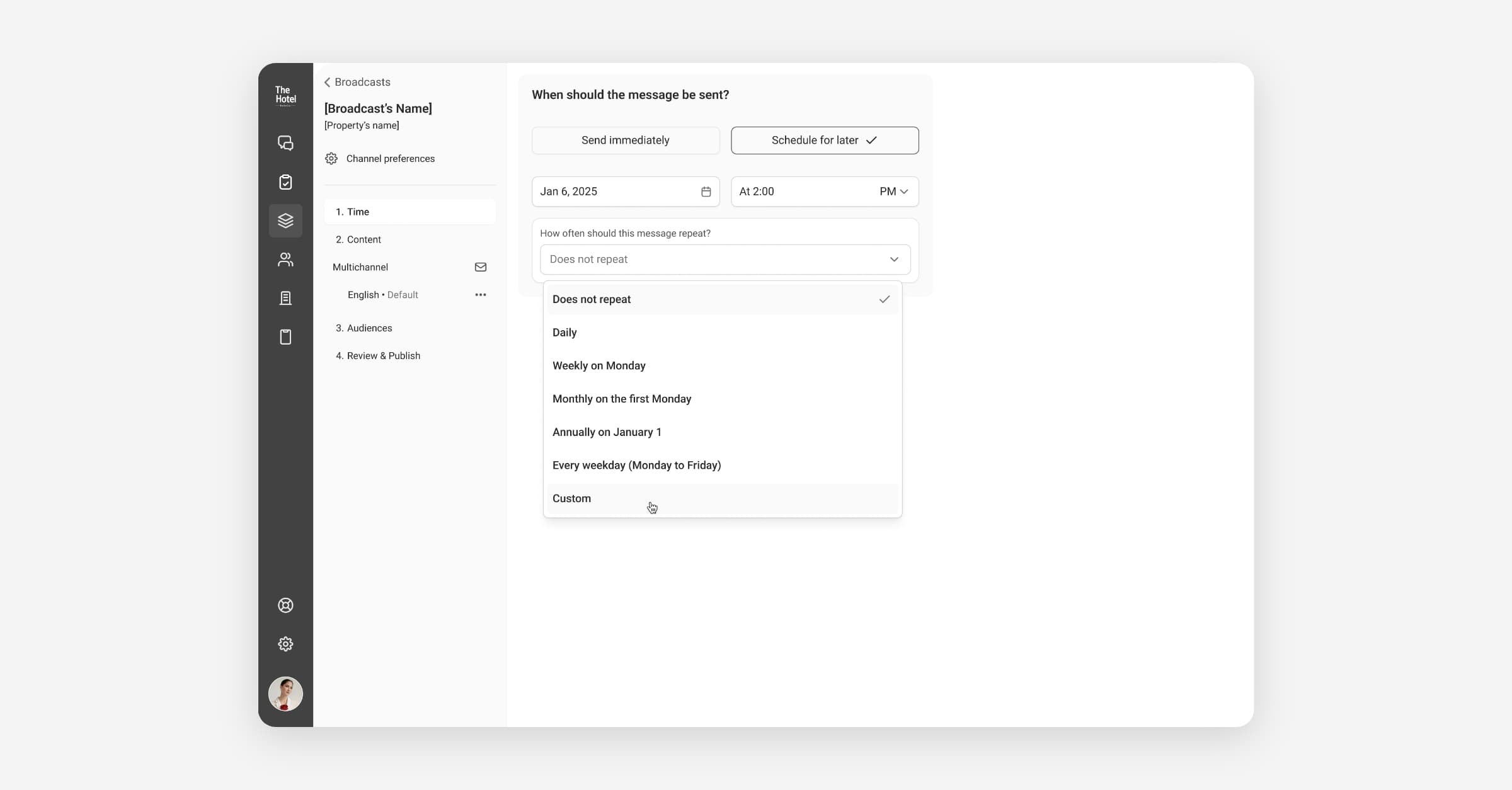
Recurring Broadcasts
You can now schedule recurring broadcast campaigns that run automatically on a set cadence — no need to manually re-send each time. This is ideal for regular communications like monthly newsletters, seasonal promotions, or weekly update emails.
Recurring Broadcasts are currently in BETA — reach out to [email protected] for access.
Slash Commands for Quick Replies
Agents in the Unified Inbox can now insert Quick Replies using a / slash command directly in the message composer. Type / followed by the name of a template to instantly find and insert it — no more browsing lists mid-conversation. This reduces response time and friction, particularly for high-volume inboxes where speed matters.
Go to the Unified Inbox and type / in the message composer to try it.
Teams Reporting in Inbox Dashboard
The Unified Inbox dashboard in Bookboost Insights now shows performance broken down by team. Team leads can track response times, resolution rates, and conversation volume per team in one view — making it easier to spot bottlenecks and coach agents based on real data.
Go to Insights → Inbox Dashboard to see team-level metrics.
Opera Cloud: Reservation Guest Profile Sync
Guest profile data linked to individual reservations in Opera Cloud is now synced into Bookboost. This enriches guest records with stay-specific profile information from the PMS, improving the completeness of guest data available for personalisation and automation.
Guestline 2-Way Integration
Bookboost now supports a two-way integration with Guestline, keeping guest profiles and reservation data in sync between your PMS and Bookboost in real time.
The Guestline integration is currently in BETA — contact [email protected] if you would like to find out more about our Guestline integration for your properties.
More improvements & fixes
Bookboost Inbox
Email images display inline
Images attached to or embedded in incoming emails now render inline within the conversation thread, instead of being collected at the bottom of the message.
Bookboost CRM
Reservation page tabs
Activity, Extras, and Event Log tabs on the Reservation detail page now load correctly for Apaleo-connected properties.
WA template sync stability
Additional fixes to WhatsApp template synchronisation to prevent intermittent 500 errors.
SMS templates showing as rejected
Fixed an issue where valid SMS templates were incorrectly displaying a rejected status.
AI Agent in the Unified Inbox
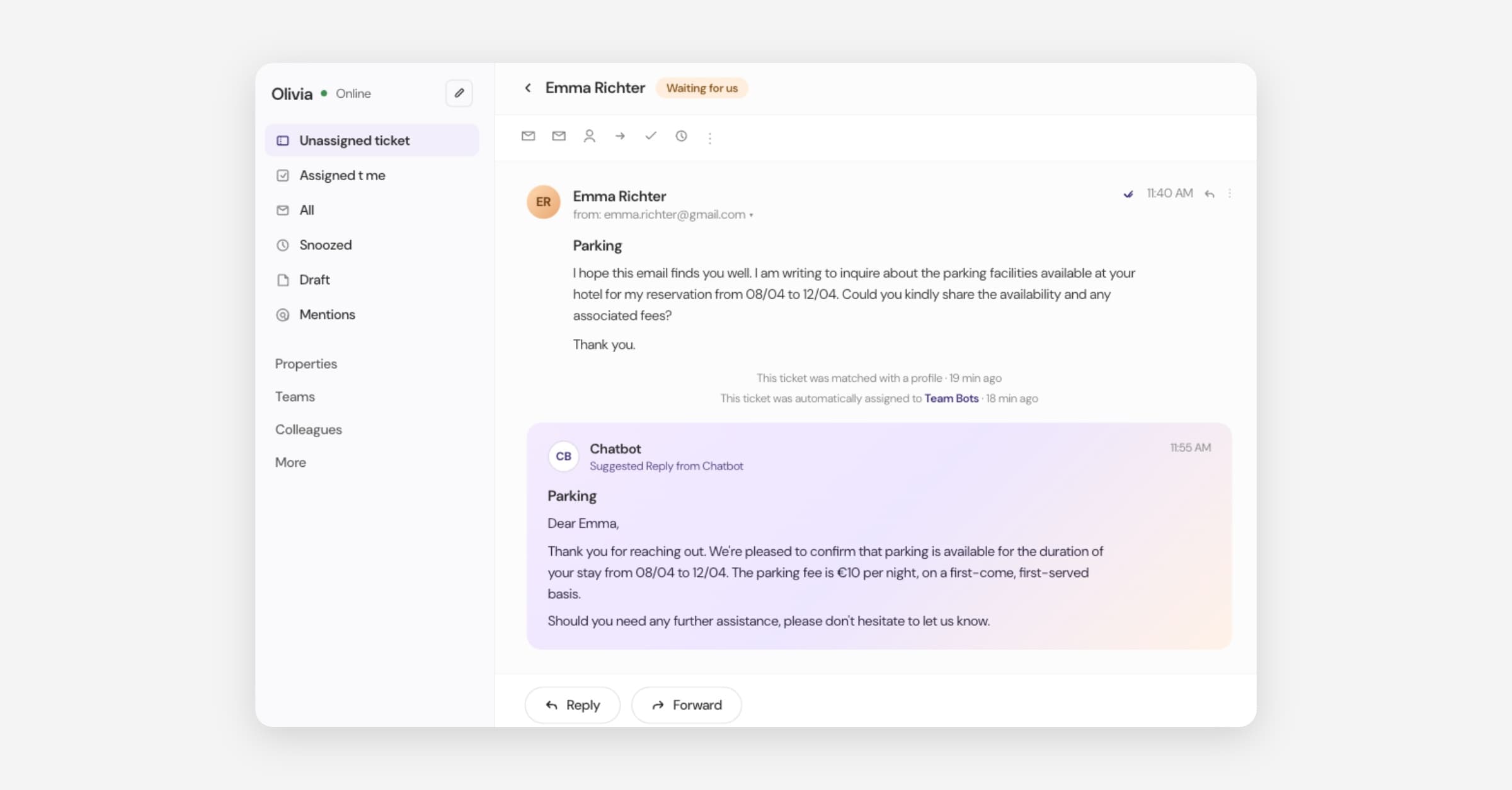
AI Agent in the Unified Inbox
We have released the Bookboost AI Agent — an autonomous AI that handles incoming guest messages in the Unified Inbox, resolves common requests, and escalates to your team only when human attention is needed. The AI Agent reads full conversation context, accesses reservation data, and responds in the guest's preferred language across email, WhatsApp, and web chat. You control which ticket types it handles, set escalation rules, and monitor AI performance alongside your team in the Inbox dashboard.
The Bookboost AI Agent is currently in Early Release — reach out to [email protected] to get access.
Real-Time Mews Webhooks
Bookboost now receives real-time event webhooks from Mews, replacing slower polling-based sync. Reservation changes, guest profile updates, and check-in/out events now flow into Bookboost faster, ensuring your CRM data stays current and automations trigger on time.
More improvements & fixes
Bookboost CRM
Two-click unsubscribe
Emails now support a compliant two-click unsubscribe flow via a Twig function, keeping your sends aligned with email deliverability best practices and regulatory requirements.
Opt-in date in Consent data
Guest consent records now include the exact opt-in date and time, giving you a full audit trail for GDPR compliance.
Functions displayed alongside tokens
When composing messages, personalisation functions now appear in the same panel as tokens, so everything you need is accessible in one place.
Fixes
Bookboost CRM: WhatsApp template sync no longer causes intermittent 500 errors when templates are already up to date.
Bookboost CRM: Resolved a long-standing issue where campaign schedules would occasionally get stuck in a queued state and never send, requiring manual intervention.