Bookboost changelog
New Ticket Creation Flow, Saved Guest Views & More
New Ticket Creation Flow
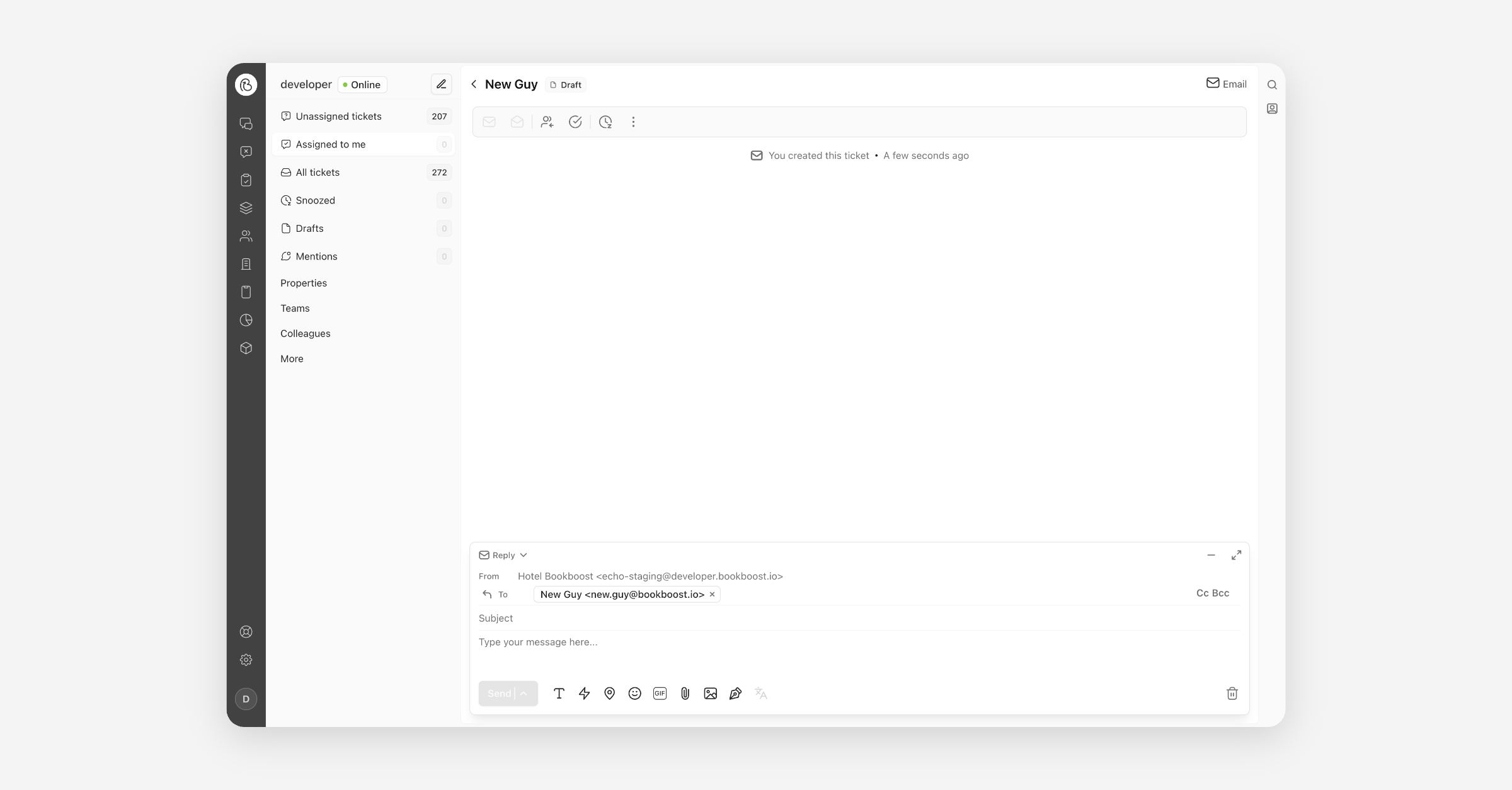
Starting a new conversation in the Inbox is now as quick as writing an email. Instead of setting up a guest profile before you can type, you open the composer, search for a guest in the To field — or simply type an email address or phone number — choose the channel and the property you are sending from, and send. If an open ticket already exists for that recipient, we show it before you send so you can continue the existing conversation rather than starting a duplicate, and anything you leave half-written is saved to Drafts.
Saved Views on the Guests Table
You can now save your favourite filters on the Guests table as views. Set up the filters, columns and sorting you need, give the view a name, and it is one click away the next time you open Guests. Keep a view to yourself or share it with everyone in your organisation so the whole team works from the same list, and send a colleague the link to open exactly what you see.
Require Two-Factor Authentication for All Operators
Organisations can now require every operator to use two-factor authentication. Once enabled, each operator sets up an authenticator app the next time they sign in — scan a QR code, enter the six-digit code, and they are protected by a second factor from then on. It is off by default; contact your customer success manager to require it for your organisation. If someone loses their authenticator, Bookboost can reset it so they can set up a new one.
Property-Scoped AI Agents
Your AI Agents can now be tied to a single property or kept across your whole organisation. If you run the same Agent name at several hotels, use the scope selector at the top of the Agent overview to switch between properties and see exactly which Agents belong where, and a property-scoped Agent will only ever pick up conversations belonging to that property. We've also standardised the wording: what was sometimes called a "Bot" is now consistently an "Agent" across the interface.
More improvements & fixes
Bookboost CRM
Multiple sending and reply-to addresses for campaigns — You can now send campaigns from more than one email domain, and choose a different reply-to address for each campaign — even on another domain. Add your approved addresses under Campaigns → Email addresses, then pick them when creating a campaign. To add a new sending domain, please contact our support team.
Spam complaint metrics in campaign reporting — Your spam complaint rate is now visible in the marketing dashboard alongside hard and soft bounce rates, and each individual campaign and journey report shows how many recipients marked that message as spam. History is available from day one.
Bookboost Inbox
Drag-and-drop attachments in the composer — Drag files straight from your desktop into a conversation and they'll attach to your reply. Email supports multiple files at once; messaging channels take a single image or document. The conversation shows you exactly what will happen as you drag, and flags files that are too large or the wrong type.
Improved inbox and recipient search — Search now matches on part of an email address, a phone number from either end, and words from a ticket's subject line. Results keep loading as you scroll, and each category shows how many matches it has.
Routing rules with deleted audiences no longer break auto-assignment — A team rule pointing at a deleted audience now evaluates as "no match" instead of failing the entire assignment pass. Conversations keep reaching the right team, and the broken rule is flagged in red in your team settings so it's easy to find and fix.