Bookboost changelog
Guest Insights, AI Agent Reservation Context & More
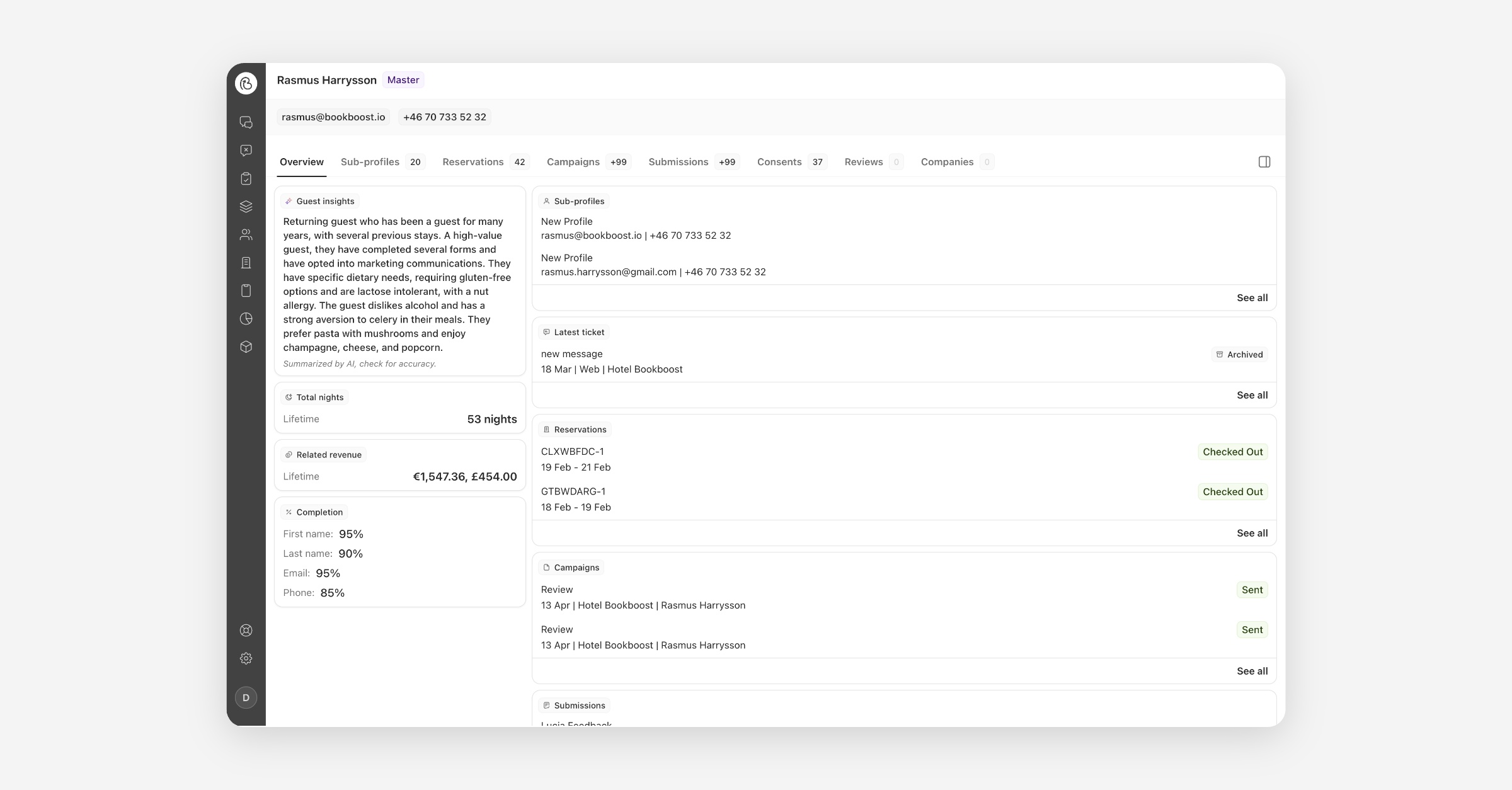
AI Guest Insights on the Master Profile
The master profile now opens with an AI-generated Guest Insights summary — stay patterns, travel habits, and preferences like allergies or favourite room types, distilled from reservation history, reviews and notes into a few sentences. Summaries are privacy-first: names, exact dates, and amounts are deliberately left out. Open any guest's master profile and the Guest Insights card on the Overview tab does the rest.
AI Agent: Reservation Context on Trusted Channels
Your AI Agent can now answer guest questions about their reservation — arrival date, nights, extras, total price, booking status — directly and accurately. Verification is effortless: on WhatsApp, SMS, or email, the guest simply provides their booking reference, and the system matches it against their contact on the reservation automatically. Once verified, the agent answers immediately and the channel stays verified for 7 days. Guests replying to a reservation campaign are verified implicitly, with no booking reference needed at all.
Reservations Views: Arrivals, Departures and In-House
Finding the right reservations just got faster. The reservations list now has four views in the sidebar — All, Arrivals, Departures, and In-House — so you can go straight to who is checking in, checking out, or staying with you right now. Pick a timeframe of today, tomorrow, the next seven days, or any custom date range, and layer on extra filters if needed. Each view remembers how you last set it up, and every view has its own link so your morning list is always one click away.
Invite Several Operators at Once
Inviting colleagues is now quicker and more complete. Paste a whole list of email addresses from a spreadsheet or email and invite everyone in one go. Bookboost fills in each person's name from their address, and you can set what properties they can see, what role they have, and which team they join — all before anything is sent. Typos and duplicates are flagged before invitations go out, and if something fails you can retry just that person without re-inviting everyone else.
Inline Text Formatting in the Guest App
You can now format individual words inside a text block on your Guest App pages. Highlight any part of your text and a small toolbar appears with bold, italic, strikethrough and link — or type the way you would in a chat message, with asterisks for bold and underscores for italic. It means the detail that matters — a check-in time, a wifi password, a note that something is unavailable — can stand out on its own, without splitting your text into separate blocks.
More improvements & fixes
Bookboost CRM
View in Browser Link for Campaign Emails — Add a "View in browser" token to any campaign email and every recipient gets a unique link to a web version that looks exactly like the email they were sent.
Total Money Spent now includes all linked reservations — A guest's spend now counts every reservation they're connected to — including stays they booked for others — so your spend figures and audience segments reflect the people really driving revenue.
Bookboost CDP
Flexible broadcast revenue attribution in BB Insights — Analyse campaign revenue using the attribution window that best matches your business, instead of a fixed 30-day rule. Open the Marketing Dashboard and apply the window you want.
Language filtering in the BB Insights Marketing Dashboard — See how sends, opens, clicks, replies, and conversions differ across the languages used for your recipients, so you can optimise content and targeting with more precision.
Apaleo: children now imported correctly, reservation tax fixed — Children on Apaleo reservations were previously never imported, and reservation tax figures were overstated. Both have been corrected across all Apaleo properties.
Bookboost Inbox
Redesigned Teams overview in Settings — Active teams now show as a ranked routing list so you can see exactly which team a message reaches first. Reorder by drag, by typing a position, or in bulk, with Undo on every change.
"Ends with" / "Does not end with" for Sender Email Address rules — Include or exclude entire domains from team routing with one rule, instead of adding a separate exact-match entry for every subdomain.
General
OTA reservations no longer lose guest and booker records — A bug causing reservations with two folio debtors to lose their guest, booker, and debtor records on every sync has been fixed. Particularly affects OTA bookings with a guest folio and a company folio (e.g. Expedia).
Reservation date filters now use local time — Date filters in the reservations table now correctly use the user's local time instead of UTC, so bookings made close to midnight appear in the right day's results.
Improved knowledge creation flow for the AI Agent — Facts and FAQs are now one unified Knowledge concept. Import from a hotel website, another agent, or a local document, and tag items to keep larger knowledge bases organised.
Automatic Sign-Out After Inactivity — Organisations can now opt in to automatic sign-out after a chosen idle period — ideal for shared reception desks. A 1-minute warning dialog lets active users stay signed in with a single click. Contact your customer success manager to enable it.